Hooknetik Blog
AI That Can Watch Videos: What It Does and Where It Fails
AI that can watch videos turns footage into transcripts, scenes and summaries. See how it works, real limits, and how to audit answers in 2026.
By Serdar Senay13 min read
- ai that can watch videos
- video understanding
- AI video analysis
- scene understanding
- video transcription
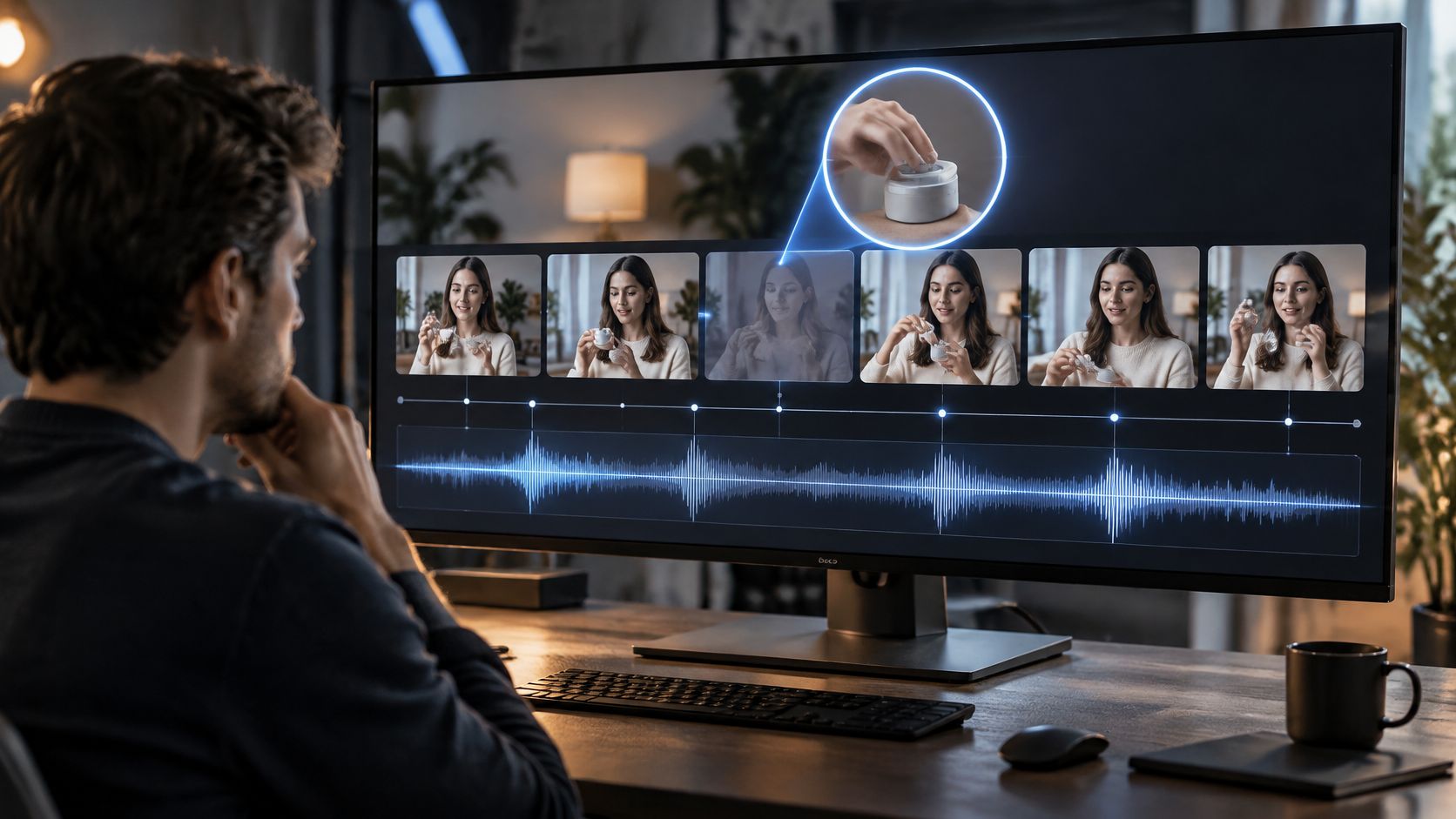
In short
AI that can watch videos turns footage into transcripts, scenes and summaries. See how it works, real limits, and how to audit answers in 2026.
YouTube receives roughly 500 hours of new video every minute, which works out to about 720,000 hours a day and 262.8 million hours a year, according to upload statistics compiled by SocialRails. No moderation desk, research team or brand-safety unit can watch a meaningful fraction of that. The pitch for AI that can watch videos is easy to understand: software that turns an unmanageable flood of footage into searchable, countable, checkable events.
The pitch is also where most readers get misled. A model can describe a clip in polished prose and still place the product reveal after the call to action, invent a gesture nobody made, or merge a narrator's claim with an action that never happened on screen. The useful skill isn't prompting. It's auditing: reading an answer as a stack of claims, each of which should point to a timestamp you can open.
Treat these systems as evidence-auditing tools with a fluent front end, and most of the confusion around them clears up.
Table of Contents
- What an AI That Watches Videos Actually Does
- How a Model Watches a Video Frame by Frame
- Where Video AI Is Strong and Where It Still Fails
- When Speech Visuals and Motion Disagree
- Worked Examples From Short Clips and Tutorials
- How to Audit an AI Video Answer Before You Trust It
- Choosing a Tool and Your Next Step
- Frequently Asked Questions
What an AI That Watches Videos Actually Does
A video-watching model is not a frame classifier with a nicer interface. It's a multimodal language model that samples frames, listens to the audio track, reads burned-in text and subtitles, and answers questions about how the sequence unfolds. The sampling part matters: the model never sees every frame, so its answer depends on which moments the pipeline decided to keep.
The jobs people hire these systems for break into six capabilities, and each one fails in its own way. The table below maps what you get against what typically goes wrong.
| Capability | What it outputs | Typical failure |
|---|---|---|
| Transcription | Timestamped text of speech and captions | Misheard names and audio that drifts out of sync with the action |
| Scene and shot understanding | Labels for scenes, settings and shot changes | Right about the broad topic, wrong about the details |
| Object and product detection | Presence and on-screen intervals for products, logos and people | Misses brief reveals when frames are sampled sparsely |
| Action and motion recognition | A description of what happens and a rough order | Events reported out of order, or motion described that never occurs |
| Summary | A condensed account with timecodes | Fluent, but drops short and commercially important moments |
| Temporal reasoning | Answers about before and after, duration and frequency | Weak on counting, ordering and identity across scene changes |
Why the six jobs don't travel together
Strength in one row tells you almost nothing about the next. A model with excellent transcription can be unreliable on event order, because the words and the action are processed through different parts of the system. A model that nails scene description can still miss a two-second logo because the sampling rate skipped it.
This is why vendor demos feel so convincing and then disappoint. The demo shows the row the system is best at. Your question usually lands in a different row.
A useful habit: when a tool impresses you, ask which capability the demo actually exercised, then test the one you care about with footage you already know frame by frame.
Read any product claim about AI that can watch videos as six separate claims, not one. The tool that summarizes a tutorial well may be the tool that misorders the steps, and only your own test footage will tell you which you bought.
How a Model Watches a Video Frame by Frame
Think of a flipbook, and think of a reader allowed to open only a handful of pages. The story still makes sense in outline. The details between pages, the hand that moves, the product that appears and vanishes, exist only in the pages nobody opened. That's the sampling problem in one image.
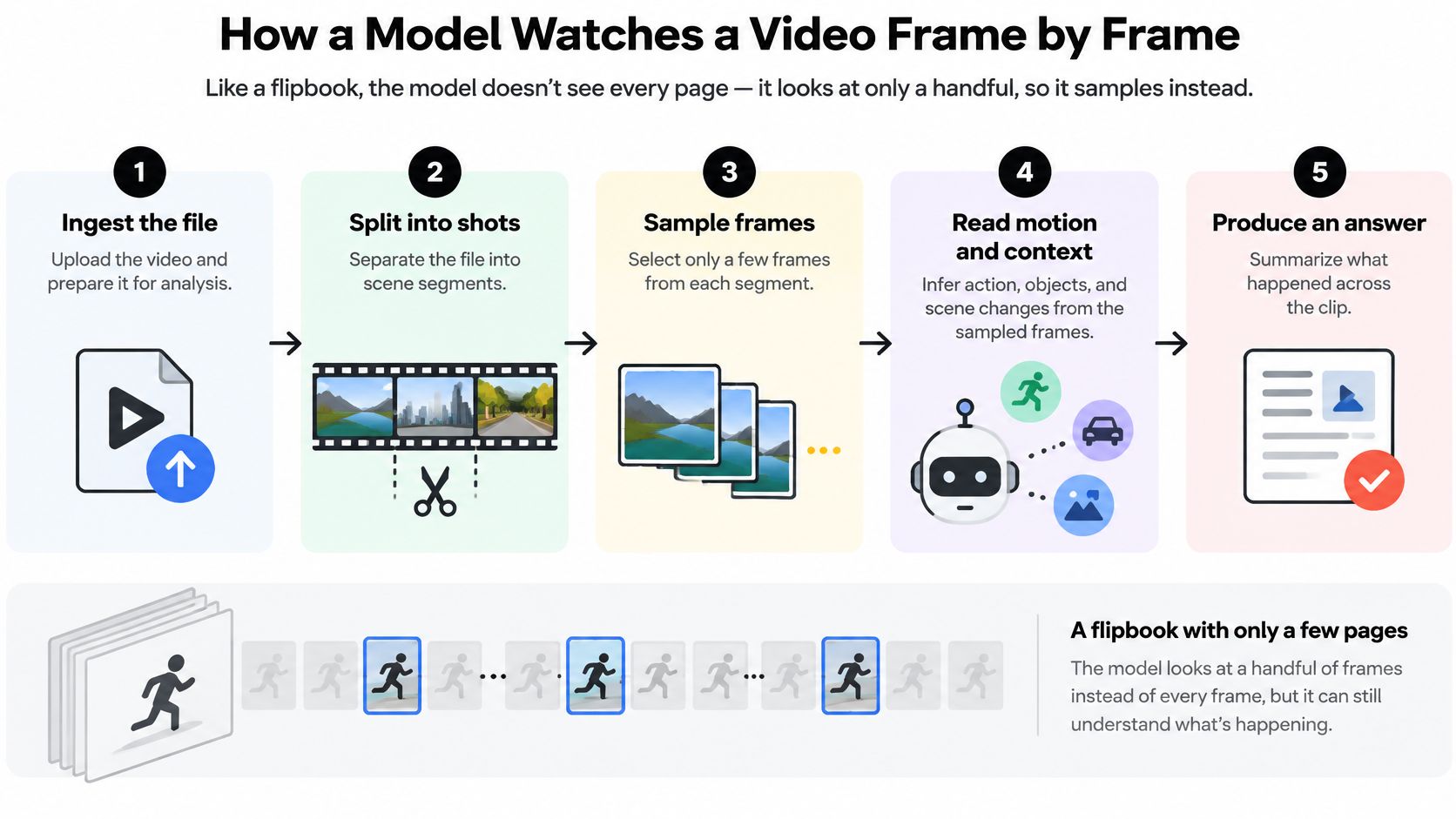
The pipeline behind a typical answer runs in five stages:
- Ingest: the file is uploaded, normalized and prepared for analysis.
- Segment: the video is split into shots or scenes so the system has natural units to work with.
- Sample: frames are pulled at a chosen rate, sometimes uniformly, sometimes weighted toward change.
- Fuse: audio, captions and sampled frames go through vision and language models together.
- Answer: the model assembles a response, with or without timestamps.
Every stage is a decision someone made. Frame rate is the one that bites hardest, because a half-second product reveal sitting between two sampled frames doesn't exist to the model.
The LongVideoBench benchmark published in the NeurIPS datasets track makes the stakes concrete: it contains 3,763 web-collected videos with subtitles, supports inputs up to one hour, and includes questions that require dense frame evidence rather than a general impression. Its authors frame long-video understanding as a retrieval and reasoning problem, not a transcription problem with a bigger context window.
The practical fix is hierarchical processing. Build cheap shot-level embeddings first, retrieve the candidate time ranges that matter, then spend expensive multimodal reasoning only on those windows. For short vertical clips this cuts compute and preserves the moments sparse sampling would skip.
Here's the same pipeline explained in motion.
Because the system is a chain, a weak link anywhere shows up as a bad answer at the end. Poor transcription corrupts the spoken-claim analysis. Aggressive downsampling corrupts the motion analysis. Ask any tool three questions before you trust it: how many frames per second does it sample, does it use audio and on-screen captions, and does every answer come back with timecodes? If you're building reference-driven content such as an AI influencer whose motion is lifted from a source clip, those answers decide whether the copied gesture survives at all.
Where Video AI Is Strong and Where It Still Fails
Evaluation research finds a sharp gap between broad video understanding and fine-grained temporal reasoning: some benchmarks exceed 80% accuracy, while a temporal-hallucination benchmark reports only 37.8% and a long-context consistency benchmark 53.1%, per the ACL findings on trustworthy long-video answers.
A video model works like an inventory clerk who can name every item on a shelf, then like a shaky witness once you ask which item moved first. Recognition and a short summary often land. Counting events, keeping their order, and refusing a detail that never appeared fail far more often. The prose can still sound sure.
| Benchmark | Reported result | What it tests |
|---|---|---|
| Broad video-understanding benchmarks | Some above 80% accuracy | General recognition and summary |
| Temporal-hallucination benchmark | 37.8% | Invented or misplaced events |
| Long-context consistency benchmark | 53.1% | Consistency across long clips |
| TemporalBench, GPT-4o | 38.0% | Event timing on multiple-binary questions |
| Video-MME at two temperature settings | 50.0% vs 44.9% | Sensitivity of answers to model configuration |
TemporalBench makes the ordering failure concrete. Its roughly 10,000 question-video pairs, derived from about 2,000 human-annotated captions, test fine-grained event understanding, and GPT-4o reached only 38.0% on multiple-binary-question answering, as reported in the TemporalBench presentation at NeurIPS 2024. The model can list the objects in a kitchen and still swap the moment the pan hit the burner with the moment the lid came off.
Configuration moves the score as well. On the Video-MME benchmark, accuracy fell from 50.0% at one temperature setting to 44.9% at another, according to the Video-MME paper. Two runs of the same model on the same clip can disagree. A paragraph with no timestamps is a fluent summary, not a record you can audit.
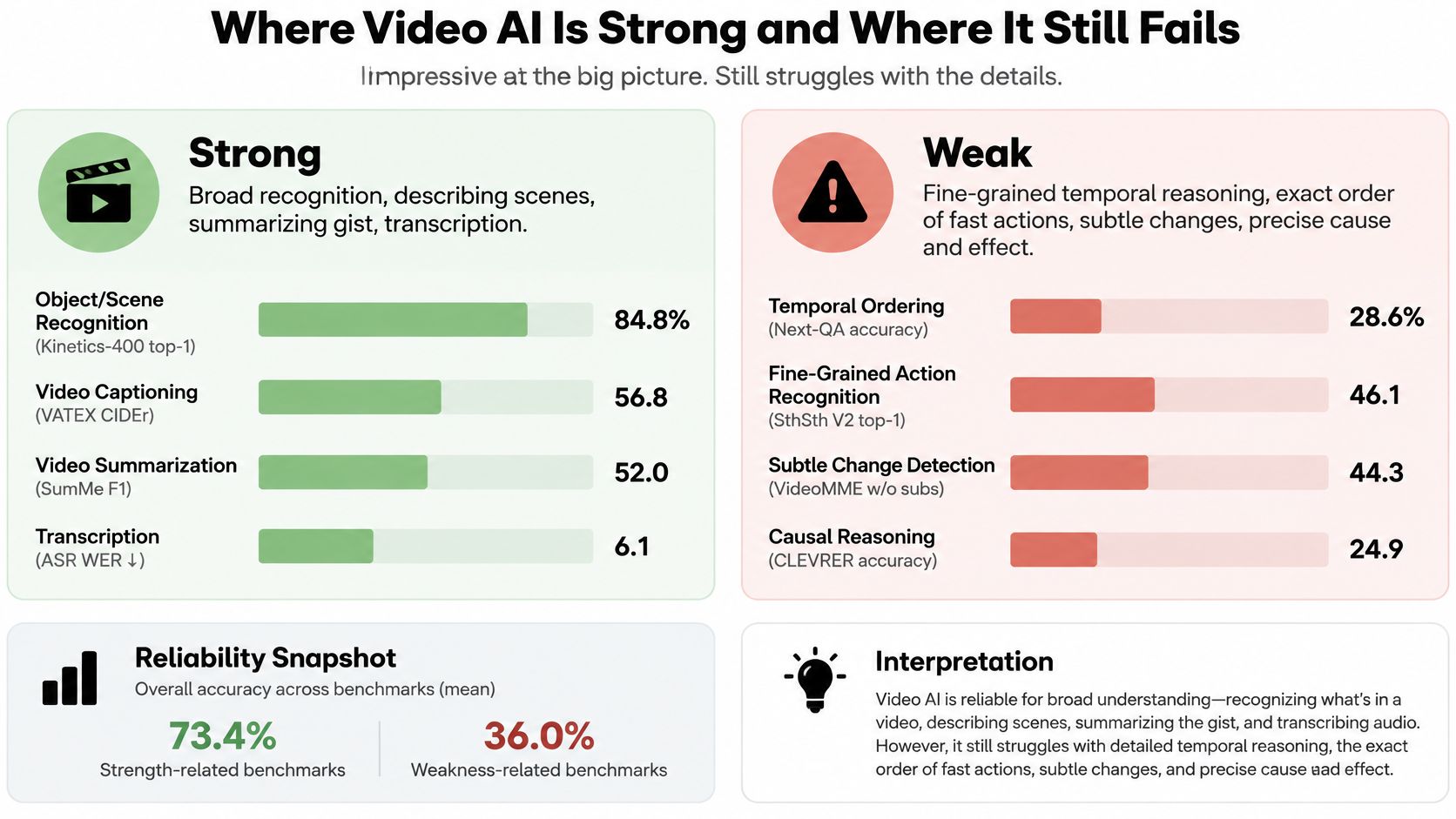
Use the model for the recognition and retrieval work it does well: finding the clip, transcribing the claim, locating the product. Route a brand-safety call, a compliance question, or a decision about which version of an ad ran to a person who can open the frames. Match the claimed action to the cited timestamp, and look for a second detail the summary invented.
The working rule: let the model narrow the footage, and let a person make the call. A fluent paragraph is not a substitute for a frame you have not opened.
When Speech Visuals and Motion Disagree
Say a 20-second clip shows a woman holding a serum bottle. The narrator says she's applying it to her wrist. On screen, she's holding it near a sink and never opens it. A caption, added later, describes the application in present tense. Which source does the system believe?
Research treats this as a distinct failure. The SVHalluc benchmark on speech-vision hallucination in audio-visual models identifies speech-vision hallucination as its own problem and reports that video-language models struggle to integrate speech with visual information, producing both semantic and temporal errors. The model doesn't flag the conflict. It blends the streams into one confident story.
Three conflict patterns show up constantly in commerce and creator footage:
- The absent product. The narrator claims a product is in use while it isn't in frame during that interval.
- The early caption. On-screen text describes an action that happens several seconds later, and the answer collapses the gap.
- The implied interaction. Transferred or generated motion suggests a hand touched, poured or applied something the character never visibly does.
Each one has an operational test. Check whether the referenced object is visible during the exact time interval the claim covers. Check whether the spoken words and the visible action are synchronized. Check whether swapping one product for another changes what the original gesture meant.
Separate outputs beat a blended paragraph. Ask for speech, objects, actions, timing and unresolved contradictions as five lists, and the disagreements become visible instead of smoothed away.
Audio adds its own layer of trouble here. If the reference audio and the visuals drift apart, a summary will describe a harmony that isn't there, which is why the mechanics of adding music and sound to short videos matter as much as the visual track when you're judging whether a clip is coherent. The contradiction list is usually worth more than the summary, because that's where brand-safety problems hide.
Worked Examples From Short Clips and Tutorials
Two short walkthroughs show the pattern on footage a seller or creator would upload.
The 15-second product clip. The AI transcribes the spoken claim, detects the serum bottle, and reports that the product is on screen for four seconds. It also notes a wrist gesture the caption never mentions. Topic, speech and product presence all check out. What it can't confirm is whether the product appeared before the call to action. Verdict: pass for summary, fail for timing.
The how-to tutorial. A longer instructional video gets summarized into steps, and two of them come back in the wrong order. That's the exact weakness InstructionBench was built to expose: 5,000 questions across 713 videos and 932 clips, averaging 282.95 seconds, split into eight task classes including three fine-grained temporal categories, per the InstructionBench evaluation. Verdict: fail on procedure order until each step is checked against a timestamp.
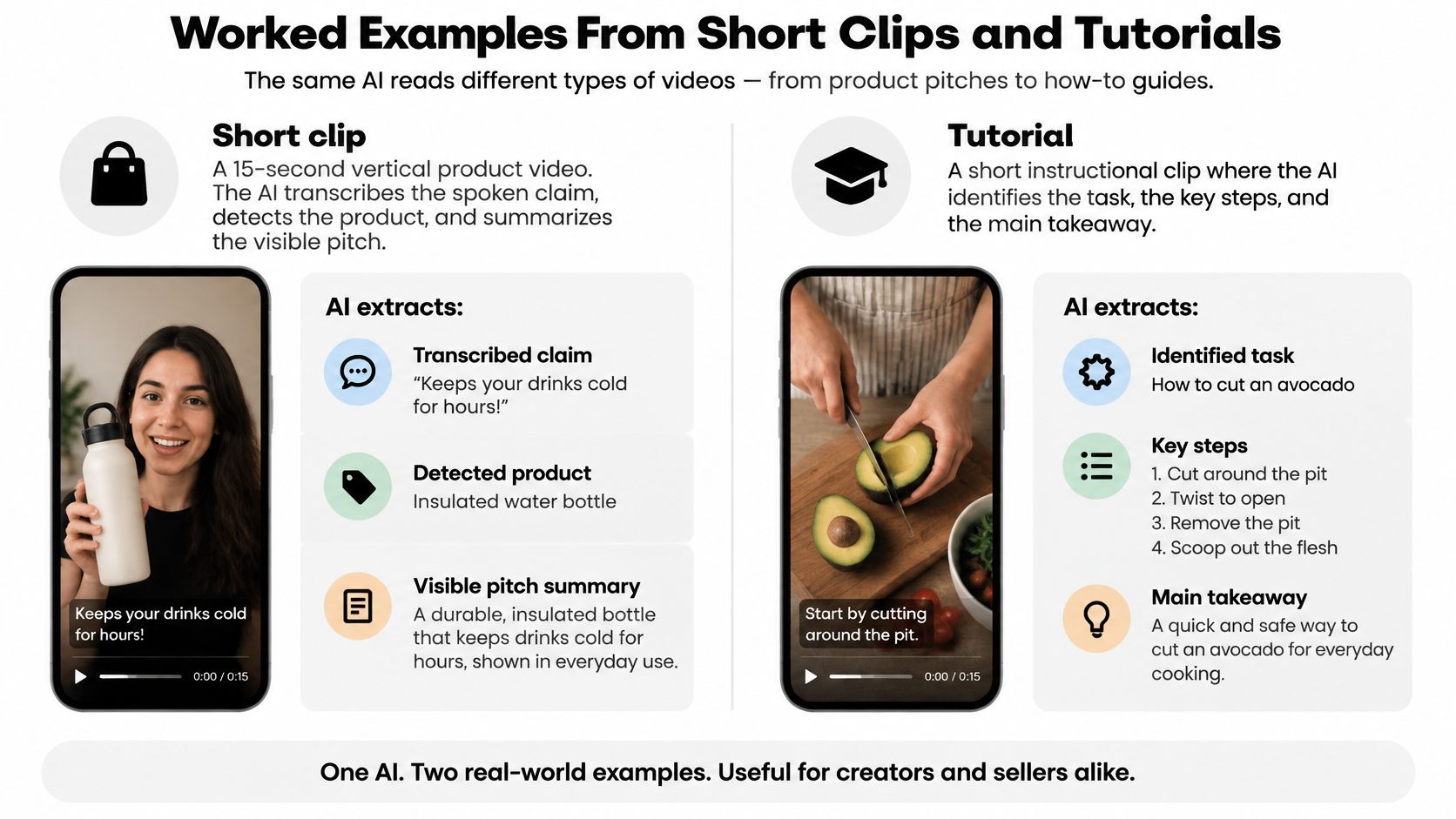
The pattern generalizes. Short clips are easier on context but harder on identity and timing. Long videos are easier on topic but harder on step order and causality. When you evaluate a tool on short-form footage, test frame-level identity consistency, transferred motion, product visibility and audio preservation rather than caption quality. A polished description is not evidence, and the editing workflow itself is where most of those mismatches either get caught or ship.
How to Audit an AI Video Answer Before You Trust It
You can run a real audit in about ten minutes. Five steps, applied to any tool, on any clip.
- Ask for timestamps on every claim, then open them. A claim that points to an unrelated moment is a red flag, and a claim with no timestamp is not a claim you can check.
- Re-ask the same question as a temporal question. Ask what happened before the call to action. If the answer flips or reorders events, you've found a reasoning failure, not a wording problem.
- Look for the observed and inferred split. A useful system labels what it saw separately from what it concluded. Inference presented as observation is how invented details enter a report.
- Feed it a clip you know cold. Score identity, product visibility, event order and audio sync separately. Any miss on familiar footage tells you how the tool behaves on footage you can't verify.
- Test the not-enough-evidence answer. Hand it a clip that doesn't contain the claim and see whether it says so or invents support.
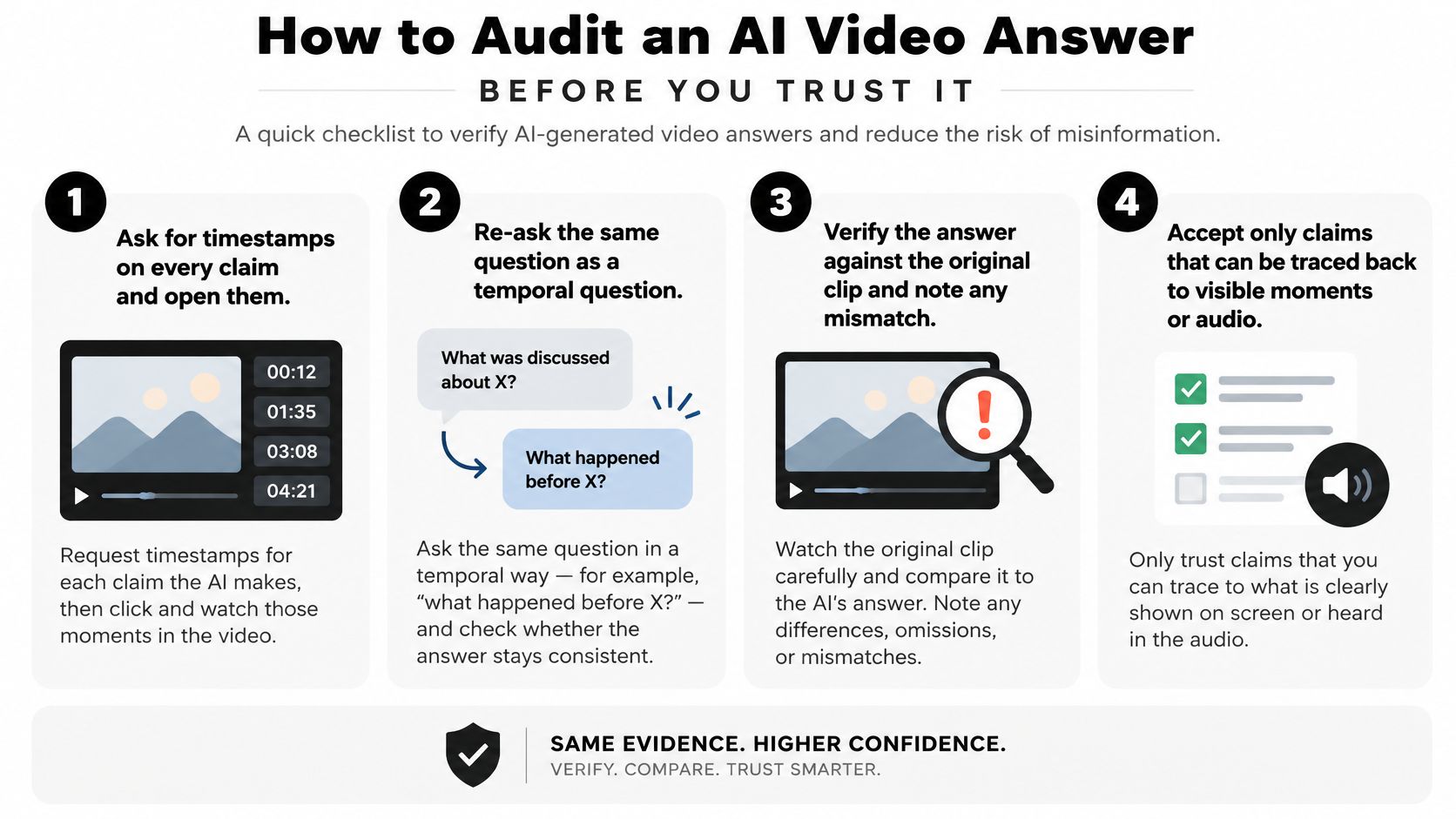
Video-MME, the full-spectrum evaluation benchmark covering short, medium and long videos, tests perception, temporal reasoning and knowledge-based understanding, which is why it works as a reference point for acceptance testing rather than a single demo, as described in the Video-MME benchmark paper. The lesson for your own scorecard is to keep visual perception and temporal reasoning as separate tests. A model can recognize a product in an isolated frame and still fail to say when it appears.
| Test | Pass condition | Failure sign |
|---|---|---|
| Timestamp check | Every claim opens to the cited moment | Claim points to an unrelated time |
| Temporal re-ask | Before/after answer holds when re-asked | Answer flips or reorders events |
| Observed vs inferred | Outputs labeled as seen or inferred | Inference presented as observation |
| Known-clip score | Identity, product visibility, order and audio sync all score full | Any element misses on a clip you know well |
| Insufficient-evidence test | Clip without the claim returns not enough evidence | Model invents the claim |
| Visual vs temporal split | Recognition and timing scored separately | High recognition with low timing accuracy |
Platform rules add a second layer. TikTok's seller disclosure guidance tells creators to proactively disclose content that is fully generated or significantly edited with AI, particularly where it could mislead viewers about real people, places or events. If your analysis feeds a publishing workflow for synthetic or heavily edited video, disclosure is part of the process, not an afterthought.
Three things worth asking a vendor before you pay: what frame sampling rate do you use, does every answer come with openable timestamps, and how do you report contradictions between speech, visuals and motion. If you're starting from free tiers, our guide to what free video AI tools actually deliver covers where the limits usually appear.
Choosing a Tool and Your Next Step
Pick by job, not by demo. For searchable archives and moderation queues, weight transcription quality and timestamped retrieval first. For short vertical clips, weight identity consistency and product visibility. For tutorials and procedure checks, weight step ordering and the ability to answer before-and-after questions. For brand-safety review, weight contradiction reporting and evidence windows above everything else.
If your workflow also produces short vertical videos built around a persistent digital character with motion taken from reference clips, Hooknetik is one option to test before committing: the one-time trial video costs $5.99 and covers one influencer, one video and one product, the Starter plan is $9 a month for 3 credits, and the Creator plan is $99 a month for 30 credits, which is one video a day. A wider set of AI video tools worth comparing is useful context before you choose.
Run the scorecard on one clip you know well this week. That single test will tell you more than any feature comparison.
Frequently Asked Questions
Can AI watch a live video?
Yes, by processing the stream in chunks. Each chunk is a moving window rather than the complete event, which can make action order harder to follow. Latency and cost also matter. For consequential reviews, record the footage and analyze the finished file.
Can it tell what's happening when there's no speech?
It can describe visible actions, but intent is harder to establish. A person reaching toward a shelf is observable; why they reach is not. Check whether the sampled frames show the action rather than accepting a plausible explanation.
Does a bigger model fix the timing errors?
Not reliably. A larger model still has blind spots if it receives the same sparse frames. Treat its answer like a claim to audit: open the timestamps and check whether the evidence supports the stated sequence.
Is it safe to trust for compliance review?
Use it for triage, with human review for decisions affecting money, safety, disclosure or brand risk.
Fluent descriptions can still misorder actions or invent details. Check the footage before acting.
Hooknetik creates short vertical videos featuring a persistent AI influencer, motion transferred from reference clips and optional product imagery. Its $5.99 trial video lets you test one influencer, one video and one product without a monthly commitment. Create your character at Hooknetik, then judge the finished clip against your scorecard, checking identity, motion and product visibility rather than relying on a fluent description.
Create your influencer, then fill the calendar.
Free to create the face. Pay when you generate videos. Start from the product demo if you want screens first.
Create your influencer free. Try one video for $5.99, or Creator at $99/mo for a video a day. Plans stack on Billing.