Hooknetik Blog
AI Influencer Video Generators Explained: How They Work
Learn how AI influencer video generators keep one character consistent, transfer motion from trending clips, and place your product in frame.
By Serdar Senay17 min read
- AI influencer
- AI video generator
- virtual influencer
- motion transfer
- UGC video
In short
Learn how AI influencer video generators keep one character consistent, transfer motion from trending clips, and place your product in frame.
You've watched the same face sell three different things this month. Same jawline, same small head tilt at the hook, different product each time. At some point you tapped the profile, found no human behind it, and started wondering what that would look like for your own shelf of products.
Then you opened a generator and hit the problem. The first clip looked great. The second looked like a cousin of the first. Somewhere between "this is amazing" and "who is this person" you realized the hard part isn't making a video, it's making the same person twice.
This guide builds up from that. What the tool outputs, how inputs become a finished vertical video, why faces drift, how motion gets borrowed without borrowing a human, where the product fits, how a month gets planned, and which rules catch creators out at the upload screen.
Table of Contents
- What an AI Influencer Video Generator Actually Makes
- How Inputs Become a Finished Vertical Video
- Keeping One Face Across Dozens of Videos
- How Motion Transfer Copies a Trend Without Copying a Person
- Choosing How Your Product Appears on Screen
- Planning a Month of Videos Without Repeats
- Disclose the Synthetic Presenter Before You Publish
- Frequently Asked Questions About AI Influencer Videos
What an AI Influencer Video Generator Actually Makes
Start with the plainest version. An AI influencer is a recurring on-screen person who doesn't exist, built in software, who shows up in short videos the way a human creator would: same face, same instinct for styling, same tone in the voiceover or the on-screen text, post after post.
Think of a puppet with a fixed face and a wardrobe rather than a one-off special effect. A special effect appears once and disappears. A puppet returns on Tuesday in a different jacket doing a different dance, and the audience recognizes the face before it reads the caption. That recognition is the actual product, not the render quality.
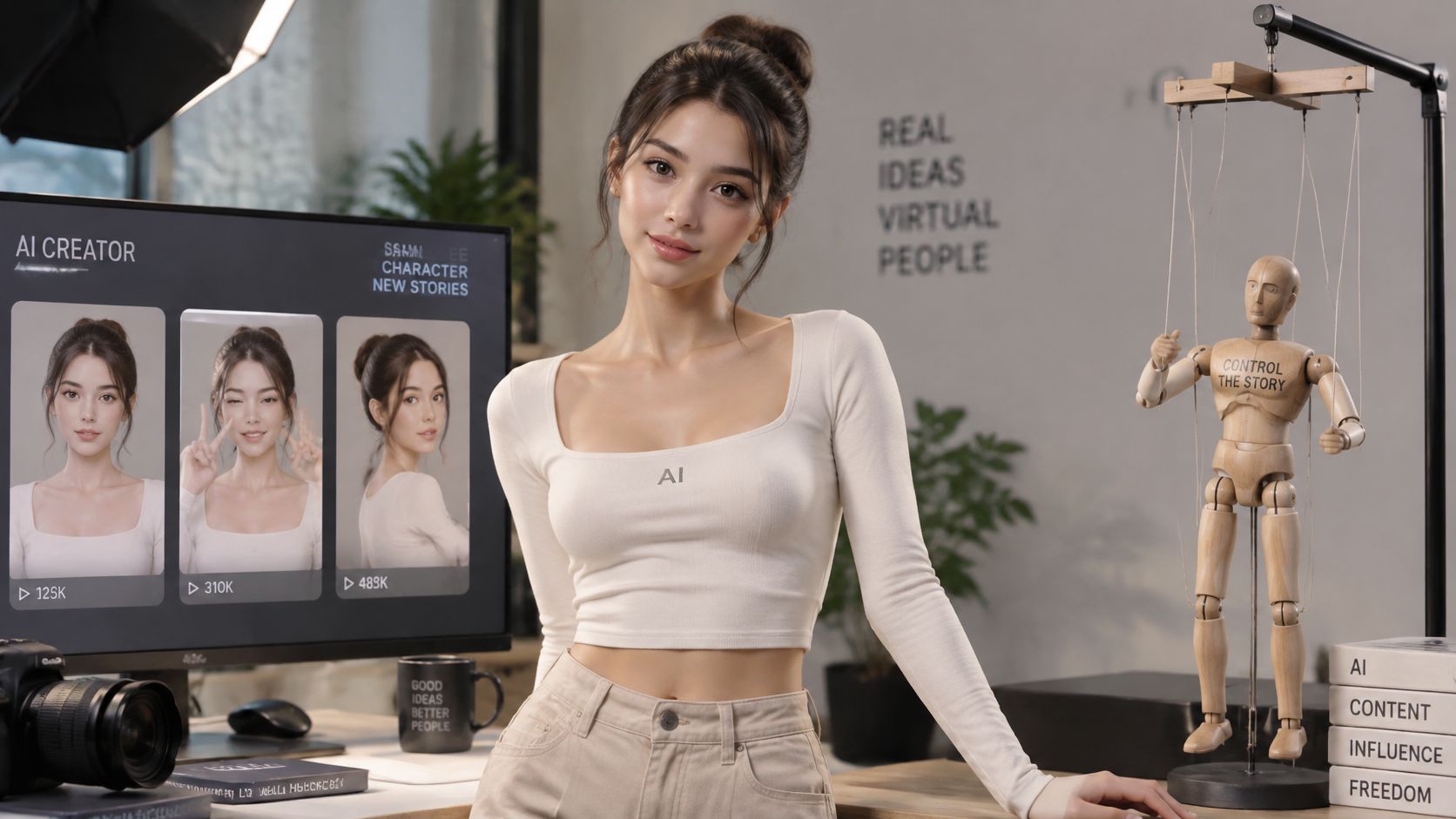
Three Parts You'll Meet in Every Video
- A persistent character. The face, approximate age, skin tone and styling baseline, stored once as a single identity instead of being reinvented each session.
- Motion. What the character does with her body, hands and timing. Usually traced from a reference clip that already performs well on the platform.
- Product imagery. The item she holds, points at or reveals. Optional, and worth skipping entirely when the goal is personality rather than a sale.
What a Generator Should Hand You
The output is narrower than people expect: a vertical 9:16 file for TikTok, Reels and Shorts, with the original audio kept inside it and a caption file you can paste when you post by hand. No editing suite, no schedule, no analytics.
The audience for that format is mainstream. A 2024 survey of 1,000 U.S. respondents aged 16 to 54 found that 53% followed at least one virtual influencer, while 22% said they were somewhat familiar with the category, as Business Insider's review of the survey data reports. People aren't stumbling onto these characters by accident.
So check any tool against four things before you pay for anything:
- A defined identity you can reuse, not a random face per session.
- A motion source you choose, from a template library or your own clip.
- A product slot, optional and switchable.
- An exportable file with captions, ready for manual posting.
Miss any of the four and you're buying clips, not building a channel.
How Inputs Become a Finished Vertical Video
The pipeline is short enough to hold in your head. Five stages, each with one obvious way to ruin it, and the order matters because a bad input at stage one can't be rescued at stage four.
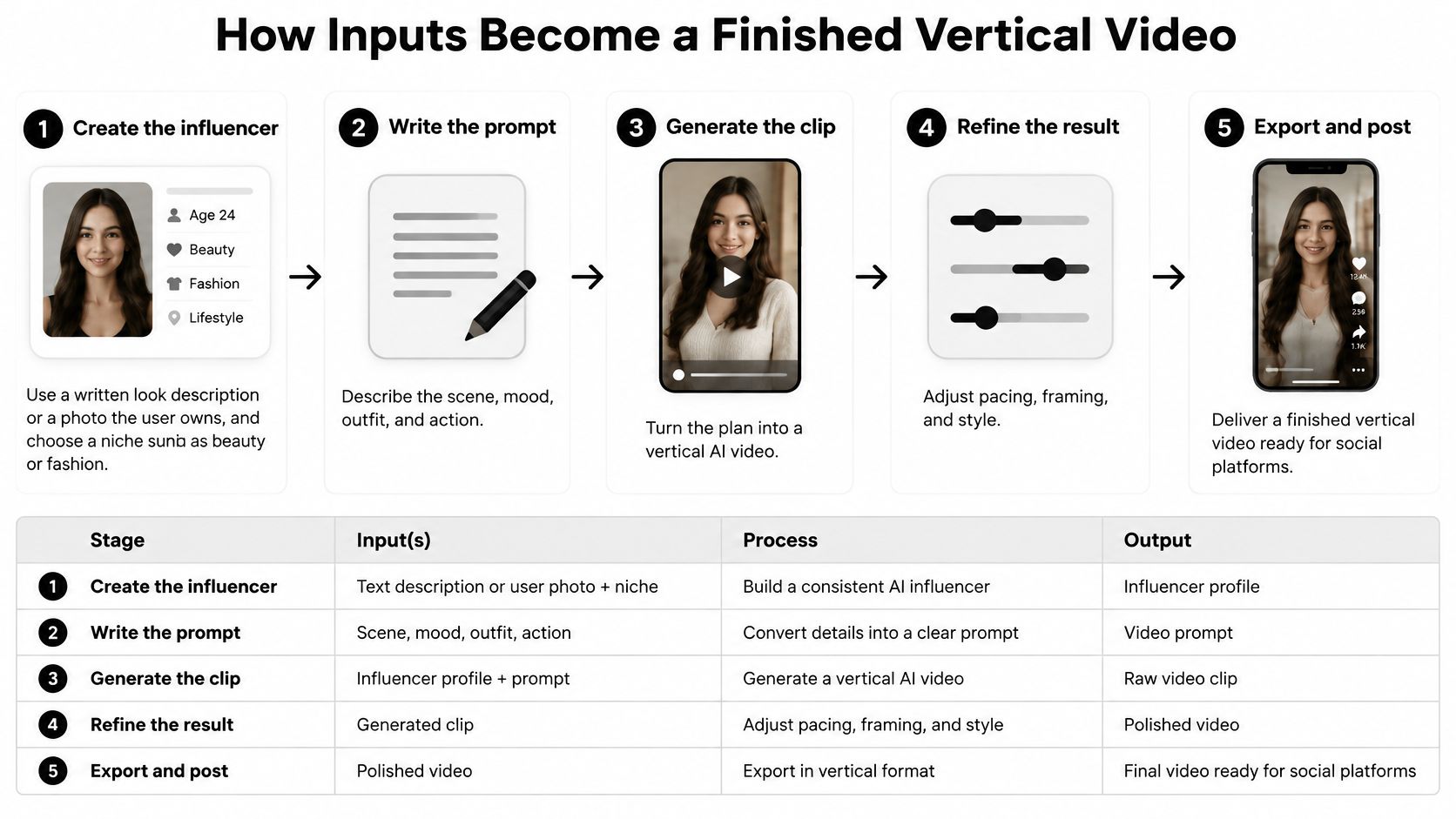
Create the influencer. You either write a look description or start from a photo you own, then pick a niche such as beauty, fashion, fitness, jewelry or luxury. The failure here is vagueness. "Young, pretty, stylish" gives the system nothing to anchor, so the face shifts the next time you open the tool. Age range, face shape, hair, skin tone and a styling reference do the work.
Add a product photo, or deliberately skip it. A clean, well-lit image of the item goes in, and the character shows it on screen. The failure is a dim, cropped or angled shot, which turns a label into a smear and a ring into a white blob.
Choose a trend. Pick a template from the library or upload your own reference clip. The failure is a clip with several people in frame, because the system has to guess whose body to trace and usually guesses wrong.
Transfer the motion. The reference motion lands on your character while the original sound stays in the video, so the timing of the audio and the timing of the movement still agree.
Export. Vertical 9:16 with a downloadable caption file, ready for whichever platform you post to manually.
Here's the same walkthrough in video form if you'd rather watch the stages than read them.
What a Healthy Export Looks Like
Three checks separate a usable video from a redo. The face is recognizable across two different clips, so you'd know it's the same character without reading the handle. The movement lands on the same beats as the reference, meaning the gesture peaks when the sound peaks. And the product is readable in the frame at phone size, not just on your laptop.
If two out of three fail, don't publish and hope. Fix the input that caused it, because the same fault will repeat across every video you generate that week.
Keeping One Face Across Dozens of Videos
The most common complaint about AI video tools isn't quality. It's identity. Generic tools redraw a face from scratch each time, so a brand's character looks like a new person every Monday, and the audience has no reason to remember any of them.
The fix is structural rather than cosmetic. You create the influencer once, either by describing a look or by starting from a photo you own, and that face stays the same in every video afterward. On Hooknetik, outfits and hairstyles get built from that same face rather than replacing it, which is the difference between a wardrobe change and a recast.
This is how the category's earliest successes worked. Lil Miquela, launched in 2016, accumulated more than 2.5 million Instagram followers and roughly 1,350 posts by the end of November 2024, and a forensic academic study examined 334 sponsored posts published between January 2021 and June 2024, according to HubSpot's overview of AI influencers. That volume of persistent output is what turns a render into a recognizable media identity.
What Stays Fixed and What Can Change
A jewelry seller's character can wear gold hoops and a white shirt in one video, then a denim jacket and a low bun in the next, and still read as the same woman in her late twenties with the same dry tone of voice.
The split that matters: face, approximate age, niche and tone are fixed. Outfit, hairstyle, setting, camera framing and the product are variables you adjust per post.
Practically, that means setting a default outfit once and overriding it for a single video or a single calendar day, so a launch week looks different without the character turning into a stranger.
Why Faces Drift
Two inputs cause most of it. A low-resolution source photo gives the system too little detail to hold, and a contradictory description ("early twenties" plus "mature, motherly styling") pulls the face in two directions at once. Switching source photos mid-campaign does the same damage. If you change the reference, expect the face to change with it.
The Three-Clip Test
Generate three clips with different outfits and settings before you schedule anything. Put them side by side on one screen and compare the hairline, the eye shape, the skin tone and the proportions between the eyes, nose and mouth. If all three read as one person, start the calendar. If not, fix the source photo or the description first, because a month of drifting faces costs more to unpick than a week's delay.
How Motion Transfer Copies a Trend Without Copying a Person
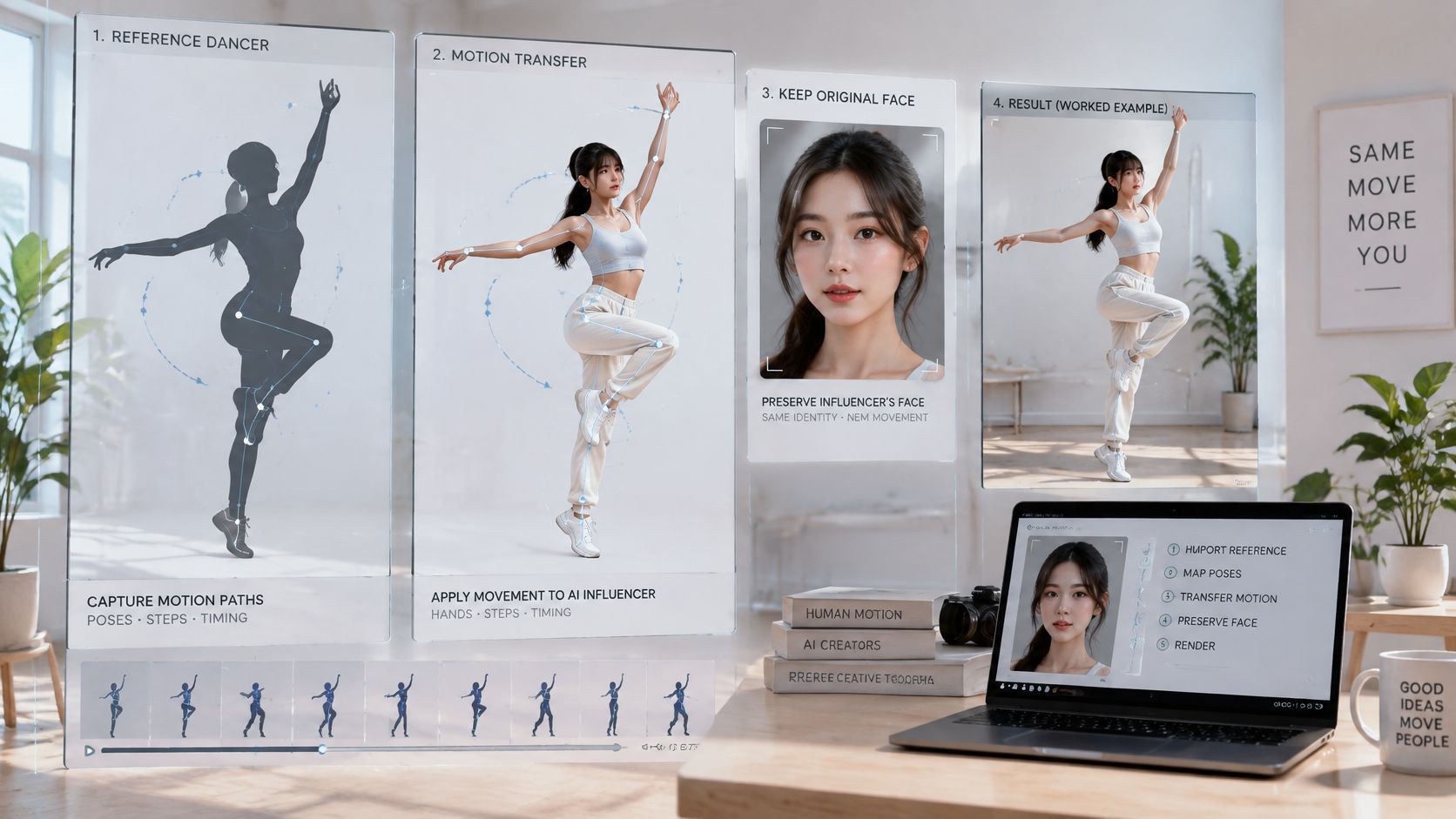
Motion transfer works like teaching choreography to a different dancer. The routine moves: the poses, the hand gestures, the timing of a turn. The body and the face don't. Your character performs the movement, and the person in the original clip is nowhere in the output.
Take a trending clip with a three-second hair flip and a product reveal at the five-second mark. Your influencer repeats the flip on the same beat and holds the product up at the same moment, while the original sound keeps the audio hook landing where the audience expects it. Nothing about the original performer transfers, only the grammar of the movement.
Two Places to Get a Reference Clip
A library template is fast and tied to what's working right now, which matters because a trend has a short commercial life. A clip in the library usually comes with usage already sorted, so the rights question is answered for you. If you want to see how product sellers pick from that kind of library, this guide to viral motion templates for AI influencer product videos walks through the selection logic.
An uploaded clip gives you control over timing, framing and the exact reveal moment, which is useful when you've shot your own reference or licensed footage. The trade-off is responsibility. You have to hold the rights to what you upload, and "it was on TikTok" isn't a licence.
Where Transfer Breaks Down
Some movement doesn't survive the trip. Anything that depends on handling a physical object transfers poorly, because the fingers, the product and the physics stop agreeing. Fast camera cuts confuse the pose sequence. Two or three people in frame force a guess. Shaky, handheld framing moves the whole body around and flattens the gesture.
Choose clips with one clear person, a plain background and steady framing. Complexity in the reference becomes distortion in your video.
Before you commit to a reference, run this check:
- One person on screen, ideally centred and fully visible.
- Obvious gestures with a clear start and finish rather than subtle shifts.
- A hook inside the first two seconds, since that's what viewers keep.
- Rights confirmed for any clip you upload rather than pull from a template library.
Choosing How Your Product Appears on Screen
The product photo is the one input that decides whether a video sells anything. It is the image your influencer holds, shows or points to, and its quality sets how accurately the item reads at phone size. A sharp, honest photo turns a plain clip into a shoppable one. A rushed photo leaves viewers guessing at the strap, the clasp or the logo.
The mechanics are simple.
You add a product photo, your influencer shows that product in the video, and the product can be swapped on any given day. You can also set one product as the default and override it for a single calendar date, so one character can carry a whole catalog without a reshoot. When a post is meant to build the character rather than sell, you skip the product entirely and keep the video focused on personality.
| Setup | Best For | Trade-off |
|---|---|---|
| Product in frame every video | Catalog-led shops selling a single product line | Needs a clean photo and accurate scale for every item |
| Personality only | Building a character before selling anything | Fewer sales signals and fewer product claims to support |
| Product swapped per calendar day | Multi-SKU shops running a monthly calendar | Needs a tidy product library and captions updated for each swap |
How to Photograph an Item for This
Shoot front-on or at a three-quarter angle, on a neutral background, with even light from both sides rather than one hard lamp. Include something that establishes real scale, a hand or a familiar object beside the item. Without that reference, a tote bag can render at wallet size.
Small items need extra care. Rings, earrings and pendants lose detail at phone resolution, so move the camera closer and let the item fill more of the frame. A ring photographed from a metre away becomes an unreadable dot once the video is compressed and watched on a bus.
Before you upload, check the photo against this list:
- Front-on or three-quarter angle, so the item's shape reads clearly.
- Neutral background with even lighting on both sides.
- A scale reference in frame, a hand or a familiar object.
- Tight framing on small items so detail survives compression.
The Caption Rule That Prevents Returns
Every claim in your caption has to match what the viewer can see. If the text says "hypoallergenic sterling silver" and the frame shows a chunky gold-plated hoop, you have created a return, a complaint and a review you cannot delete. The same rule covers colour, size and finish, and it applies every time you swap the product. A caption written for Monday's pendant has to be edited before Wednesday's earrings go live.
Once your product library is in order, swapping the product for a given day is a quick change inside the calendar, and this walkthrough on preparing a product catalog for AI influencer videos covers the setup.
Planning a Month of Videos Without Repeats
Thirty videos sounds like thirty decisions. It isn't, if you plan in one sitting and then execute. Work through six steps.
- Pick a weekly theme. A launch week, a styling week, or a behind-the-product week. The theme stops you from inventing a concept every morning.
- Assign a trend template or reference clip to each day, rotating deliberately so no two consecutive videos share the same motion.
- Pair each day with one product, or with nothing at all when the post is meant to build personality instead of sell.
- Draft the captions and check every claim against the product. This step prevents most returns, before anything is generated.
- Download the video and the caption file for manual posting, then apply disclosure at publication.
- Review results after seven days and swap out any template that stopped performing.
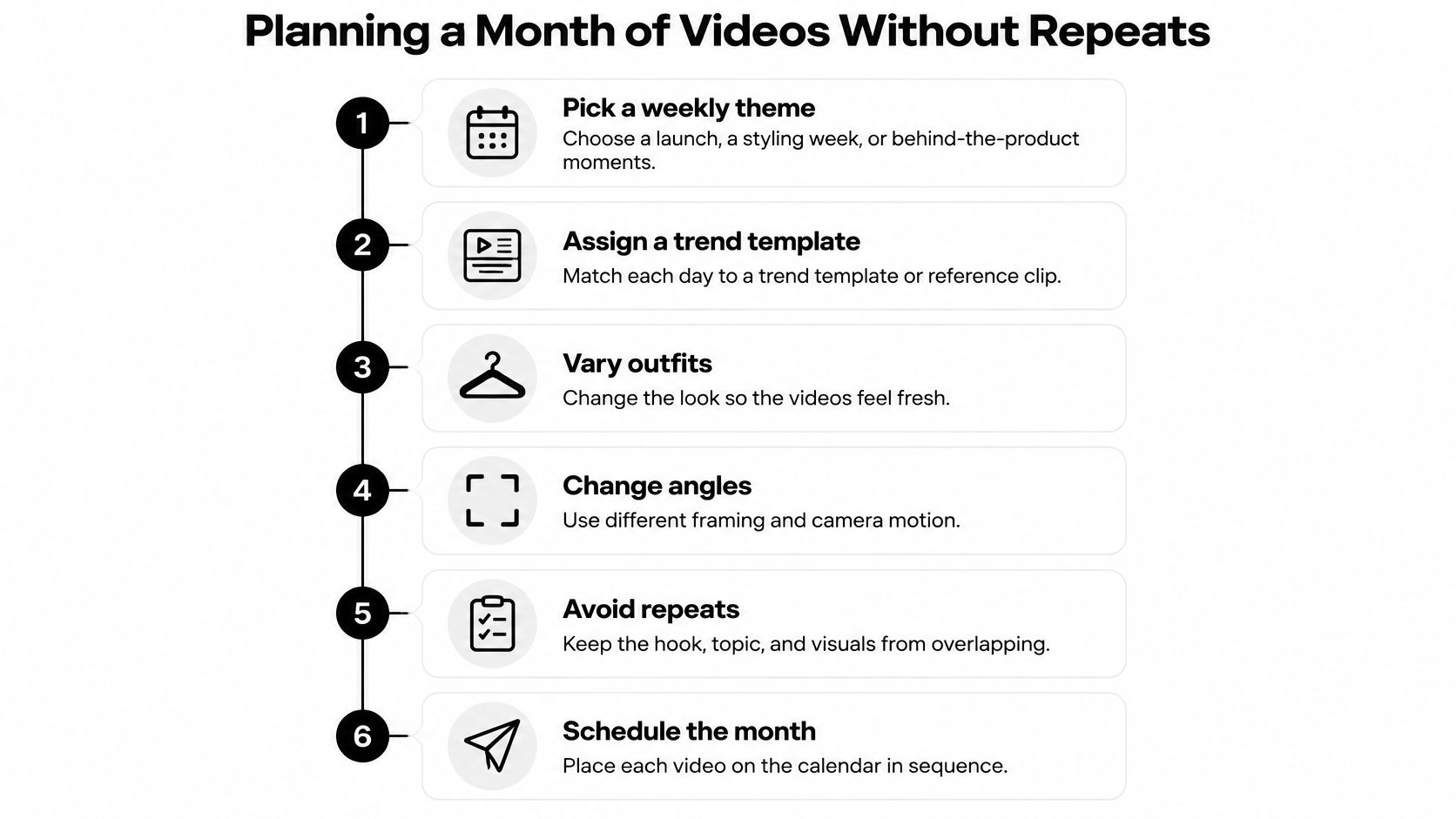
Do the arithmetic once and the appeal is obvious. Say a jewelry shop has three templates and three products. Rotate the templates across the products, vary the outfit and the framing, and a single month of planning produces around thirty distinct videos without a reshoot, a model or a studio day.
Calendars earn their keep when they can flex. Any plan you build should allow a template change, a product substitution, a caption edit and a pause, because a trend that dies in week two shouldn't drag the rest of the schedule down with it.
Keep a Log, Not Just a Folder
For every video you generate, record an internal asset ID, the generation date, the reference clip used, the product photo, the edit history and the consent notes for anyone whose footage appears. Store the record somewhere that survives re-encoding and reposting.
Why bother when the file seems to carry its own information? Because embedded signals don't travel well. A file that gets cropped, resized, recompressed by a platform or edited loses the watermark baked into it, and the signed metadata that records origin gets stripped on export or repost. Your own log is the only version of that history you control. Keep it at ingest and check it again before anything goes live.
Disclose the Synthetic Presenter Before You Publish
Disclosure looks like a legal formality until you watch what it does to a video's numbers. Then it becomes a design decision, and a testable one.
A study analyzing more than 1 million TikTok posts found that posts carrying an AI-generated-content disclosure were associated with lower consumer engagement, and eight preregistered experiments with 3,396 participants supported the same direction, as reported in the Journal of Consumer Research. The likely mechanism is reduced perceived authenticity or increased psychological distance. Viewers who figure out that the performance is synthetic interact less, even when the video is well made.
That tension shows up in consumer attitudes too. A Typeform report on influencer credibility found that 61% of consumers believe influencers should disclose AI use, while 35% distrust AI-generated influencer content. People want the label and still discount what's under it.
Hiding the synthetic origin doesn't protect engagement. It just moves the loss to the moment your audience finds out, which they eventually do.
The workable answer is to test placement and wording instead of burying them. Track watch-through rate, completion rate, saves, comments, click-through rate and conversion separately, because a disclosure can depress upper-funnel engagement while raising the quality of the people who stay.
The Rules by Source
| Rule Source | What It Requires | What to Do Before Posting |
|---|---|---|
| FTC Endorsement Guides | Paid or gifted promotion by a virtual endorser must be clearly and conspicuously disclosed with the endorsement | Place the disclosure on screen and in the caption, not in a bio or behind a link |
| TikTok's AI-content rules | Entirely AI-generated or significantly altered content must be disclosed, and the creator toggle shows the label "Disclosed by creator as AI-generated" | Enable the AI-generated toggle and avoid any AI claim that misleads viewers about products or people |
| Instagram's branded content policy | Paid, free-product or other valuable partnerships need a branded-content disclosure at publication | Apply the disclosure tool when posting and don't assume the export satisfies it |
| Your own A/B test | Disclosure changes engagement, and the effect has been measured both in observational data and in controlled experiments | Hold character, product, hook, audio, posting time and caption constant, then vary only the disclosure |
One detail the FTC is explicit about is prominence. A disclosure has to be easy to notice, read and understand, standing out through size, contrast, location and how long it stays on screen, according to the FTC's guides concerning endorsements and testimonials. A line buried in the description or hidden behind other visuals isn't enough.
Build a Chain of Custody, Not a Watermark
Provenance should be engineered as a chain of custody rather than a single stamp on the file. NIST's work on synthetic content provenance draws the line between digital watermarking, which embeds a detectable signal in the audiovisual output, and metadata systems such as C2PA, which attach signed assertions about origin and modification history. Each fails differently. Watermarks drop away after cropping, resizing, recompression or editing, and metadata gets stripped on export, repost or platform processing. So keep the internal record alongside the export, and verify both at ingest and again before publication. NIST also notes the limit plainly: provenance establishes origin and integrity, but it doesn't prove the depicted claims, identity or product performance are true.
Before you commit to a monthly plan, one video is enough to learn the workflow. Creating an influencer is free, and a one-time trial video costs $5.99 and covers one influencer, one video and one product, so the plan decision comes after you've seen a finished result rather than before.
Frequently Asked Questions About AI Influencer Videos
Is it legal to use an AI influencer to promote products?
Yes, under the same endorsement rules as a human spokesperson. Product claims have to be truthful, any material connection has to be disclosed clearly next to the endorsement, and a synthetic presenter cannot claim personal experience it never had. Treat the character like an ad asset with a compliance file, not like a loophole.
Do AI influencers get as much engagement as human creators?
They can, but credibility usually matters more than novelty. Audiences tend to respond to whether the character feels believable and consistent as much as to production polish. A presenter who only appears while holding a product reads as an advert, so let the persona carry some clips with no product in the scene.
Can one character promote several products?
Yes. Keep the same face and swap the product photo by day or campaign, and the character can front a catalog the way a retained spokesperson would. Outfits and hairstyles can change around that face. What cannot rotate is accuracy: each item needs its own honest description, scale reference and caption that matches what is on screen.
How do I keep one identity over a long run?
Create the face once, keep it fixed, and review each new clip against recent posts before scheduling. Drift usually comes from rebuilding the character, rewriting the look description mid-campaign, choosing a reference clip whose motion overwhelms the persona, or letting captions promise something the scene does not show. For a wider tool comparison, see this guide to the best AI video options.
What should I test before a monthly calendar?
Run three clips: one personality-led video with no product, one product demo, and one trend transfer. Check the face, motion, sound, caption and product placement separately, then decide whether the character is reusable or needs a rebuild.
Hooknetik turns a written look description or a photo you own into a persistent AI character whose face is created once and kept across new outfits and hairstyles, transfers motion from trending templates or your own clip while keeping the original sound, and can place your product in the scene or leave it out for a personality-led post. It delivers vertical 9:16 videos with downloadable captions for manual posting. You can create an influencer free and test a single video before committing to a calendar. Visit Hooknetik to build the face once and reuse it across a month of posts.
Create your influencer, then fill the calendar.
Free to create the face. Pay when you generate videos. Start from the product demo if you want screens first.
Create your influencer free. Try one video for $5.99, or Creator at $99/mo for a video a day. Plans stack on Billing.